Ethernet – The Basics
Most computers today use Ethernet technology to connect to their respective networks. Wired or wireless, the characteristics are meant to function similarly.
Why Wireless?
In today’s industrial (and even nonindustrial) applications, running cables can be tedious and expensive. One too-tight staple in a run of cable can greatly diminish the speed or even render it virtually useless causing you to bring in specialized technical personnel. Cable also limits the placement of a device whereas wireless connectivity allows a device to be mobile and flexible in positioning as the needs demand. For example, if a truck scale has a driveway between it and the scale house, running an underground conduit can be expensive and time-consuming. In this situation, placing one antenna on top of the scale house and another one on a pole, next to the scale, can solve the problem easily.
In another situation, a long length of cable that is vastly unprotected from harsh elements would typically be a connection requirement between the scale house and a remote scoreboard. A wireless connection is able to solve this problem as it is an excellent candidate for connectivity anywhere there is a possibility of damaging a scale cable. In addition, remember that a home run cable can be damaged by excessive force such as vehicular traffic, but if the excitation lines are shorted in that process, the instrument can also be damaged, incurring a significant repair bill. Using a junction box and converting the home run cable to a wireless connection can alleviate that possibility. Always consider the entire cost of ownership of a system including repairs that may come up, rather than just the simple initial cost.
Range can also be an issue. Some wireless connections can operate over a few miles under the right conditions. These connections can help with remote access to data as well as remote printing in another location for auditing and tracking transactions as they occur.
Wi-Fi Standards
The wireless Ethernet standards were developed by the IEEE (Institute of Electrical and Electronic Engineers) and have the designation of 802.11x where x is one or two letters. These standards determine some of the communications protocols and the frequency used for transmission. The designations start with “a” and are currently up to 802.11ax, but here are the more common ones:
- 802.11a The original 802.11 release
- 802.11b The second release – uses the 2.4 GHz frequency for longer outdoor range
- 802.11g The next major release after b, with data rates up to 54Mbps
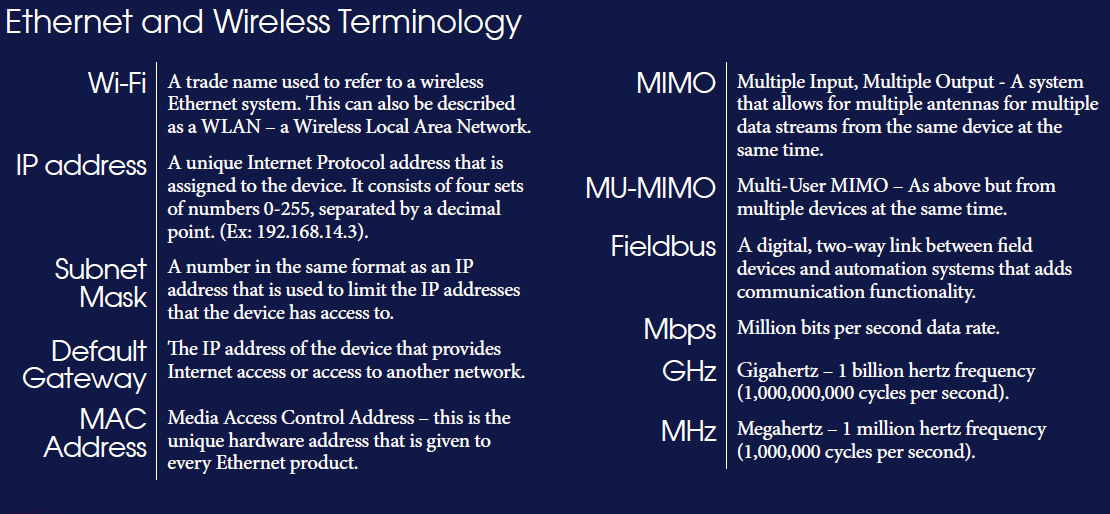
- 802.11n Uses either 2.4 or 5 GHz, higher bandwidth, higher speeds, up to four simultaneous data streams (MIMO)
- 802.11ac Uses only 5 GHz frequency but can use eight streams with 4X the bandwidth. This gives much higher speed and allows for multiple users simultaneously. Release 2 of this standard will support MU-MIMO